Pages

Sunday, December 07, 2014

A major WhatsApp bug - remote crash

There is a major bug in the Android version of WhatsApp. The bug works until Version 2.11.432. Remote crashing someone's app certainly sounds catchy. Here is how it works - you have to send a 2 KB message of special characters to a WhatsApp user. Every time that person opens the conversation his/her WhatsApp will crash. The only solution to this is to delete the conversation. If you send it to a group, all the members will have to exit the group as the moment they will try to open it, the app will crash.

You can try it out yourself. Please note that TechPositivity.com shall not be held responsible for your actions. This information is for education purpose only.

Go to: http://pastebin.com/3efiBva4 and copy the raw data of special characters. Open WhatsApp and send it to a person whose WhatsApp you want to crash. The moment you send it, your app will crash too. Delete the conversation after sending the message. iPhone and Windows phone users are not vulnerable to this bug.

Friday, December 05, 2014

Get rid of WhatsApp blue ticks without disabling Read receipts

Early November, WhatsApp introduced an interesting update. Previously, users could know when a person was last seen using WhatsApp, whether a message was sent (single tick) and whether a message was delivered (double ticks). With the new update, a user can tell if a particular message is read, indicated by double blue ticks also known as Read receipts. For some it could be extremely bothersome; there has even been a report of a Saudi man divorcing his wife for ignoring his WhatsApp messages.


Late November, WhatsApp introduced another update which allows users to disable the Read receipts option from Settings -> Account -> Privacy; that is, the sender will not know if a message has been read by a user who has disabled Read receiptsHowever, there is a drawback - the user who disables Read receipts will not know if his/her messages are read by the recipients (regardless of whether or not the recipient has disabled the Read receipts option). This update is not yet available through the stores, you will have to manually download the latest version from WhatsApp website.

I have found a way which will enable you to read a message and the sender will not see Blue Ticks against that message, all this without disabling the Read receipts option. Better yet, you will still be able to see blue ticks against your messages whenever your recipients read them unless they have disabled Read receipts on their phone. Here is what you have to do when you receive a new message notification:

Step 1: Turn off Mobile Data/Wi-Fi

Step 2: Open WhatsApp

Step 3: Go to the desired conversation


Step 4: Long-press and delete those newly received messages which you want the sender to see as unread (without blue ticks). You can even delete the entire conversation after reading the messages but this will not work for group chat as you will end up exiting the group. Then turn on Mobile Data/Wi-Fi and continue using WhatsApp as normal.

Thursday, November 20, 2014

The correct way to use Port Forwarding

What is Port Forwarding?

If you connect to the internet through a router, port forwarding could be very useful. The job of a router is to route the internet connection to the devices on the local network (PCs, laptops, smartphones, etc.). The devices on the local network are "behind the router". That is, when you try to open a website, the request goes to the router first and from the router to the remote server; similarly, when the remote server responds, the data comes to the router first and then to your device. Your router has a global IP address assigned by the ISP and your devices has a local IP address. The remote server knows you by your router's global IP address only and not your local IP address. When the data packet meant for your router arrives, the router has to effectively forward it to your device.

Servers listen for incoming connections on specified ports. If someone has to connect to a server, he has to use the global IP address. But it will lead him to the router and without telling the router where to forward the incoming connections they will never arrive. To tackle this, you have to set up port forwarding. You have to tell the router that a connection on a particular port is to be forwarded to a particular IP address & port (where your server is running) on the local network.

How to configure Port Forwarding?

Different router manufactures have different methods of configuration. The basics shall remain the same however. I have a NETGEAR router, will use it's set up interface for reference. What you need to do first is find the IP address of the router which is normally 192.168.1.1 or 192.168.0.1. If you do not know, open command prompt and type ipconfig on Windows or ifconfig on Linux. The default gateway address is the address of your router. Type this IP address in the address field of your browser and log in to the management panel with the username and password (usually admin & admin). If you do not know the credentials, find out on RouterPasswords. Once you are in the management panel's homepage, look for Port Forwarding/Port Triggering. You may have to look inside advanced settings.


Click on add custom service and give a name to the service, enter the start and end port (if forwarding a single port, start and end port should be the same) to be forwarded and the type of connection (TCP/UDP).


Click apply, return to the port forwarding page and click add.


Select the service you just created, make sure "ALLOW Always" is selected as the action, enter the IP address of your local device and click apply.

Now restart your router and the port forwarding changes shall be in effect.

NOTE: Do not forward all ports. That is, while specifying start and end port, do not specify from 0 to 99999 or something similar. This will choke your router and you will not be able to use the internet connection at all.

Sunday, November 02, 2014

Top 3 free running 3D Mobile games

Here is our list of top 3 free running 3D games for Mobile.

1. Subway Surfers

This is a game about running on subway tracks while being chased down by a security guard and his dog. The more you run and the more you collect coins, the more points you get. Obstacles involve parked and oncoming trains; if you hit one, the security guard catches you and it's game over for you. You can save yourself with "keys" which are rarely found while running and you can purchase them alternatively from the store for real money.

Various power ups like jetpack, snickers, etc. make this game exciting.
 The score multiplier increases up to 30x upon completing challenging tasks.

2. Temple Run 2

Second version of the supper hit 3D game Temple Run. Quite similar to Subway Surfers, the more you run and collect coins, the more points you get. A wild monkey chases you who will catch you if you hit something. Obstacles  include half complete bridges, rocks, waterways, etc. The sound effects, the monkey and the textures introduce an element of thrill. Gems are rarely found while running which can be used to continue the run when caught by a monkey and can also be purchased from the store. 

The score multiplier increases upon completion of challenges. 


3. Street Skater 3D

A slight mismatch with the title of this post, this game is not about free running but is about skating. The concept however remains the same. Instead of running, you travel using a skateboard. Cars, rocks, blocks, etc. will be encountered as obstacles. 

You need to collect coins in order to score more. A leader board features in the game which lets you compete with player all around the globe.


Tuesday, October 07, 2014

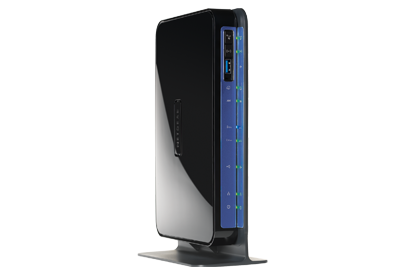
Netgear DGND3700 Review

Netgear DGND3700 is a great choice for people with too many wireless devices. With a dual band antenna and a 802.11 b/g/n capable chip-set, this router can deliver wireless speeds of up to 600 Mbps. The in built ADSL2+ modem with built in VDSL support can deliver speeds of up to 24 Mbps (ISP dependent). 2 USB ports - one for 3G modem and one for printer/file sharing. With the latter feature, you can connect your printer to this router and issue a print command from any supported device on the network. Similarly, you can connect your USB drive to the router and use it to share files with supported devices on the network. 

DGND3700 has 4 gigabit Ethernet ports and 1 gigabit WAN port. WPA2 is the highest wireless security offered on this device which is pretty much unbreakable with a tough password. WDS support is also available which means you can expand your wireless network with multiple access points without a network backbone. The only shortcoming of this router is that, it does not have IPv6 support.

Thursday, September 25, 2014

Nikon D5300 - DSLR with Wi-Fi and GPS


Nikon D5300 is not your ordinary DSLR. Alongside the complex image capturing and processing features, there is an important connectivity feature - Wi-Fi.

This camera sets up a mobile hotspot to which mobile phones and tablets can connect and access pictures and videos stored on the camera/memory card. Nikon has provided iOS and Android apps to do so.

D5300 ships with an inbuilt GPS receiver so that you can geo-tag your pictures the moment you capture them. No need to have another software to do so.

Key Nikon D5300 features


  • 24.1 MP CMOS sensor
  • EXPEED 4 image processor
  • ISO 100-12,800 standard, up to 25,600 expanded
  • 5 fps continuous shooting
  • 39-point Auto Focus system, 9 sensors cross-type
  • 2016 pixel RGB metering sensor
  • 1080p video recording, built-in stereo mic
  • 1.04 M dot 3.2 inch vari-angle LCD monitor
This DSLR can significantly reduce your travel bag's weight as you do not have to carry a laptop to transfer pictures and videos.


Wednesday, September 10, 2014

About 5 million Gmail accounts compromised

Hackers have stolen passwords of about 5 million Google accounts. The list was also posted online. Google however says that there is no evidence of accounts being compromised. Security experts say that it's not Google that was actually attacked, but other sites where users registered their Gmail addresses. If you have used your Gmail password, may be your account is compromised.

It is a good idea to change your password as a security measure.

The website https://isleaked.com/results/en shows if your account is compromised. We cannot confirm the authenticity of any information/results found on isitleakead.com.

Tuesday, September 09, 2014

iPhone 6 finally shows it's face

 Apple has finally launched the most awaited iPhone 6. The company has long been criticized for coming up with small sized screens. We believe as a response to the criticism, iPhone 6 has a 4.7 inch screen and along with that, Apple has launched another variant of iPhone called iPhone 6 plus which has a 5.5 inch screen.

There was a lot of news about Apple planning to develop iPhones with bigger screens leading up to the launch event.

iPhone 6 is powered by the Apple A8 processor, carries a 8 MP camera with support for 1080p video recording .

Apple says that the battery life will be better than that of iPhone 5s. It will support GSM, 3G & LTE with support for Voice over LTE. The connectivity also features 802.11ac Wi-Fi chip-set which supports speeds of upto 1000 Mbps.

With a contract of 2 years, the Apple iPhone 6 will cost $199 for the 16 GB model, $399 for the 64 GB model and $399 for the 128 GB model. The unlocked versions will cost between $900 and $1100. Pre order will start on September 12 in the US and the UK and the deliveries will start from September 19.